
Nissan Juke Radio Code Online Generator
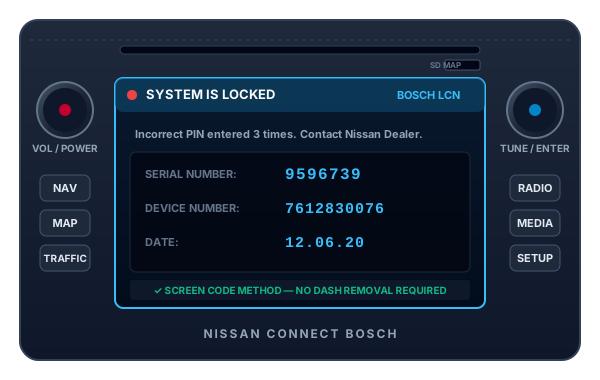
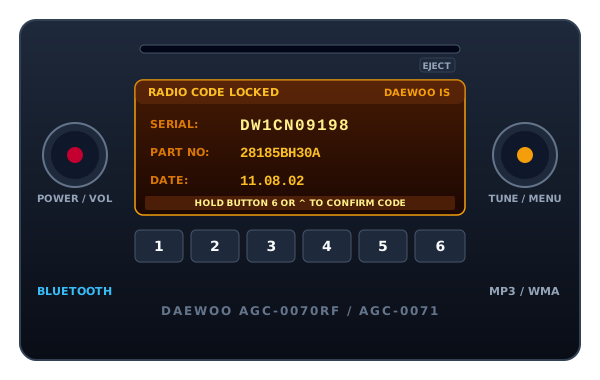
Fitted with the high-mounted motorcycle-inspired center console, the Nissan Juke typically features either the Nissan Connect 5-inch color touchscreen navigation or the Daewoo single-CD Bluetooth head unit. Both stereos allow serial number retrieval directly on screen, eliminating the need to take apart your dashboard trim.
Nissan Juke Code
Instant automated factory decoding
How to Locate Your Nissan Juke Serial & Enter Code
Follow our 3-step illustrated instructions to retrieve your serial number and enter your genuine unlock PIN.
View Serial On Juke Console
Type 3 wrong codes to trigger the locked system screen. Note the Serial Number, Device Number, and Date.
Submit Your Serial Details
Enter the values into the unlock form below for automated master code calculation.
Type PIN on Touchscreen or Presets
Enter the 4-digit code using the touchscreen keyboard or preset buttons 1 to 4. Hold 6 to confirm on Daewoo units.
Nissan Juke Radio Code Stereo Specifications
Our decoding system communicates with the official Nissan OEM authorization database. Review the technical parameters below to ensure complete compatibility with your head unit.
| Vehicle Model | Nissan Juke (F15 Series) |
|---|---|
| Fitted Units | Nissan Connect Bosch LCN 1 / 2, Daewoo AGC-0070RF |
| Display Type | 5" Color Touchscreen or Amber Matrix LCD |
| Serial Format | 7-Digit Screen Serial or DW/DS 10-Char |
| Delivery Speed | Instant Automated Delivery (60 Seconds) |

Select Another Nissan Model or Radio
We decode security codes for every Nissan vehicle, commercial van, and factory audio manufacturer.
Nissan Juke Radio Code Code FAQs
Answers to common questions about retrieving serial numbers and unlocking your Nissan Juke.