

Nissan Daewoo AGC-0070 & AGC-0071 Radio Code Generator
The Nissan Daewoo AGC-0070RF and AGC-0071RF audio head units are factory fitted across the Nissan Qashqai, Juke, Note, Micra, and NV200. When power is lost, the amber display displays "RADIO CODE" and locks all audio playback. You can retrieve the serial number directly from the display after 3 incorrect attempts, or read the white sticker on top of the casing. Our automated system calculates the original factory code from your DW or DS serial number within seconds.
Daewoo AGC-0070 Code
Instant automated factory decoding
How to Locate Your Daewoo AGC-0070 Serial & Enter Code
Follow our 3-step illustrated instructions to retrieve your serial number and enter your genuine unlock PIN.
View Serial on Amber LCD Screen
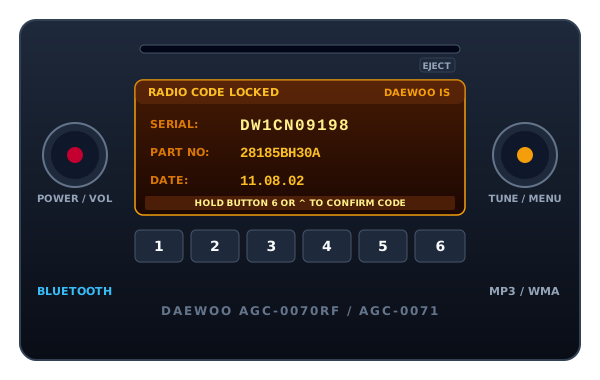
Power on the radio and enter three incorrect 4-digit codes. The unit will lock and display: "RADIO CODE LOCKED", followed by the 10-character Serial Number starting with DW or DS (e.g. DW1CN09198), Part Number (e.g. 28185BH30A), and Date (e.g. 11.08.02).
Note Your DW or DS Serial Number
Make sure to copy the exact alphanumeric string starting with DW or DS (such as DW1CN09198, DS12N10492, or HY00N...). If removing the unit, this same serial is printed on the white Daewoo manufacturer label on the top cover.
Enter Code via Preset Buttons 1 to 4
Press button 1 repeatedly for digit 1, button 2 for digit 2, button 3 for digit 3, and button 4 for digit 4. When your 4-digit PIN is displayed correctly on screen, press and hold button 6 or the Seek Up (^) button for 2 seconds to confirm and unlock.
Nissan Daewoo AGC-0070 / AGC-0071 Stereo Specifications
Our decoding system communicates with the official Nissan OEM authorization database. Review the technical parameters below to ensure complete compatibility with your head unit.
| Unit Manufacturer | Daewoo IS Corp / Humax Automotive |
|---|---|
| Display Type | Segmented Amber Dot-Matrix LCD Display |
| Supported Models | AGC-0070RF, AGC-0071RF, AGC-0060, AGC-1220RF |
| Part Number Pattern | 28185BH30A, 28185BH30B, 28185BH30C, 28185BH30D |
| Serial Format | 10-14 Characters starting with DW, DS, HG, or HY |
| Code Entry Keys | Preset Buttons 1-4 with Button 6 / Seek ^ Confirmation |
| Average Delivery Speed | Instant Online Calculation (60 Seconds) |
Select Another Nissan Model or Radio
We decode security codes for every Nissan vehicle, commercial van, and factory audio manufacturer.
Nissan Daewoo AGC-0070 / AGC-0071 Code FAQs
Answers to common questions about retrieving serial numbers and unlocking your Daewoo AGC-0070.