Nissan Cockpit Interior
ORIGINAL & GENUINE

Nissan
Radio Codes Online

Get your original radio code quickly and easily. Safe, reliable and professional service for all Nissan radios.

Nissan Seed Key

Get Your Radio Code

Instant automated decoding by serial

24/7 ONLINE
0/14
Nissan Connect Screen Values:

FAST DELIVERY

Usually within minutes

100% WORKING

Money back guarantee

SECURE PAYMENT

Card & PayPal

24/7 SUPPORT

We are here to help

Live: Nissan Qashqai Connect stereo unlocked 2 mins ago

Supported Nissan Factory Radios

Genuine factory unlock codes for all Nissan touchscreen navigation, 6-CD changers, and Bluetooth audio units.

Nissan
Nissan Connect LCN
Bosch Touchscreen Navigation
Nissan Connect LCN

Nissan Connect Touchscreen

Fitted to Qashqai, Juke, Micra, Note, and Navara. No dashboard removal required!

FORMAT: 9596739 (7-DIGIT)
Nissan
Daewoo AGC Series
Bluetooth MP3 / CD Unit
Nissan Daewoo AGC

Nissan Daewoo AGC-0070

Fitted to Nissan Qashqai, Juke, Micra, Note, and NV200. Serial on casing label.

FORMAT: DW1CN09198 / DS...
Nissan
Clarion CY / PP
6-CD In-Dash Changer
Nissan Clarion Radio

Clarion CY01E / PP-3001M

Fitted to Qashqai, X-Trail, Navara, Pathfinder, and Tiida. 14-digit serial.

FORMAT: CL081690089208
Nissan
Blaupunkt BP Series
Factory Single CD Player
Nissan Blaupunkt Radio

Blaupunkt Factory Tuner

Fitted to Nissan Micra K12, Note, and Almera. 14-digit serial starting with BP.

FORMAT: BP237534082298
Nissan
Nissan Seed Key
Cryptographic OEM Algorithm
Nissan Seed Key Radio

Nissan Seed Key Code

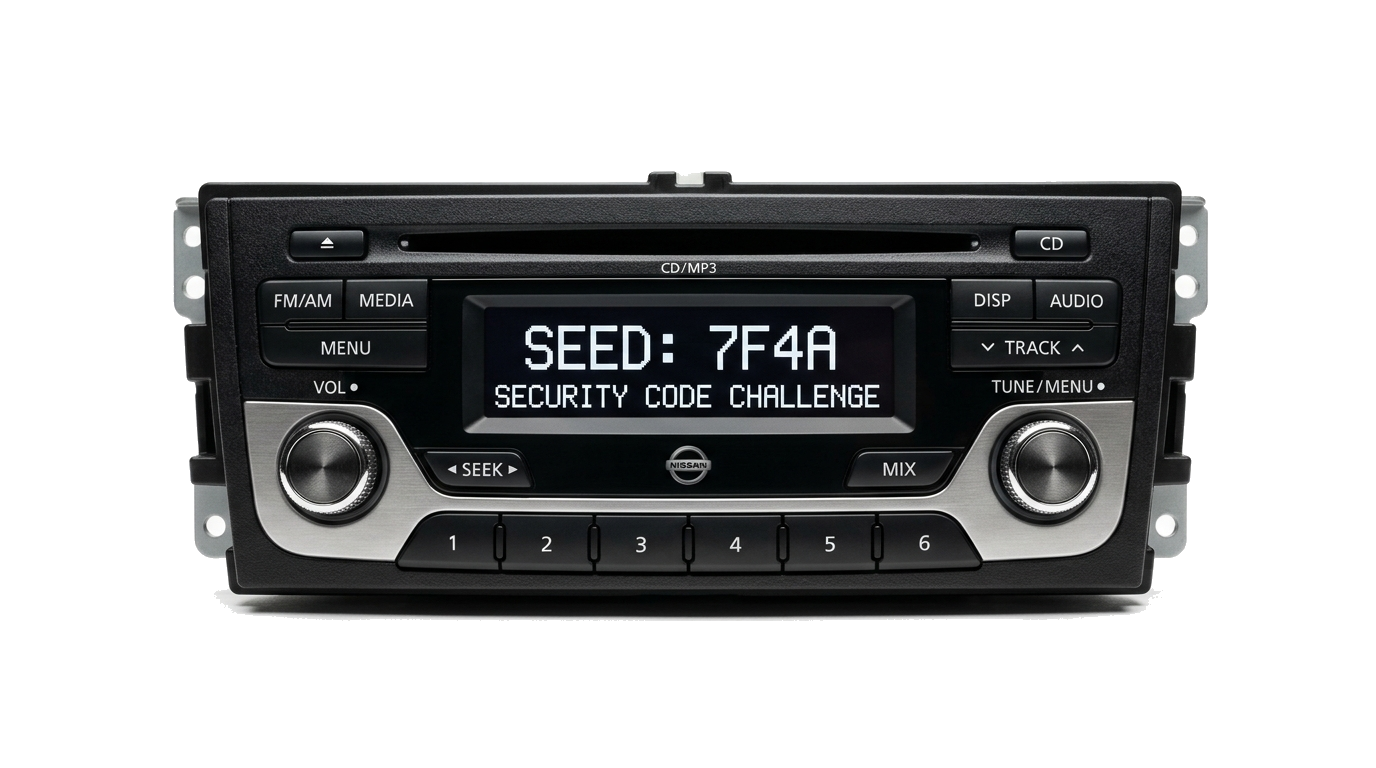
Fitted to modern Nissan models. Converts on-screen challenge SEED directly to 4-digit PIN.

FORMAT: SEED 7F4A / D8F2

Where Is My Nissan Radio Serial Number?

Select your Nissan stereo model below to see exact label photos, on-screen retrieval shortcuts, and required code formats.

Zero Dashboard Removal Required! 100% retrievable directly from the touchscreen display in under 30 seconds.
1

Turn Ignition ON & Power On the Screen

Switch your vehicle ignition to the ACC or ON position and press the radio power knob. The display will ask for a 4-digit PIN with an on-screen numeric keypad.

2

Enter 3 Random Codes (e.g. 1-2-3-4 x3)

Deliberately enter any incorrect code 3 times in a row. Upon the 3rd entry, the unit activates its anti-theft security summary screen.

3

Copy Serial (7 Digits), Device (10 Digits) & Date

The screen displays your Serial Number (e.g. 9596739), Device Number (7612830876), and Date (12.06.28). Enter these 3 values into our decoder above for instant PIN delivery.

Nissan Connect Lock Screen

ON-SCREEN DIAGNOSTIC
Nissan Connect Bosch LCN Screen Diagnostics
Click to Prefill Connect Sample:
Printed on White Casing Label: Slide unit forward to inspect the 10-character serial starting with DW or DS.
1

Unclip the Center Fascia Bezel

Use a plastic trim pry tool to gently release the friction clips around the center dash trim panel. Disconnect hazard switch connector.

2

Unscrew 4 Mounting Screws & Slide Forward

Remove the four Phillips screws holding the metal side brackets. Slide the radio forward until the top barcode label is visible.

3

Transcribe Serial (DW1CN...) & Part Number

Look for the 10-character serial under the barcode (e.g. DW1CN09198) and the part number (e.g. 28185BH30A). Enter either into our decoder card.

Daewoo AGC-0070 Casing Label

WHITE CASING STICKER
Nissan Daewoo AGC Serial Label
Click to Prefill Daewoo Sample:
14-Digit Clarion Serial: Starting with CL, or Model Number (PP-3001M, CY01E, PN-1675D).
1

Unclip Center Air Vent Console

Insert flat trim pry tools under the lower edge of the air vent bezel and pry forward. Remove the 4 Phillips screws securing the Clarion chassis.

2

Slide Unit Forward to View Side/Top Metal

Clarion stereos have their 14-digit serial laser-engraved into the sheet metal side casing as well as printed on the white manufacturer sticker.

3

Record 14-Digit Serial (CL0816...)

The serial begins with CL followed by 12 digits (e.g. CL081690089208). Enter this complete 14-character code into our online decoder.

Clarion CY / PP Factory Label

STAMPED METAL / STICKER
Clarion Nissan Serial Label
Click to Prefill Clarion Sample:
14-Digit BP Serial: Stamped permanently into the side metal housing (starts with BP).
1

Release Radio Using U-Shaped Removal Keys

Insert two standard radio removal keys into the 4 holes on the faceplate corners until you feel them click into the retaining springs.

2

Locate 14-Digit Stamped Serial

Inspect the side metal casing. You will see a 14-character serial stamped directly into the sheet metal beginning with BP (e.g. BP237534082298).

3

Verify 10-Digit Part Number (7 642...)

Blaupunkt labels also show a 10-digit Bosch/Blaupunkt part number starting with 7 642 xxx xxx or 7 649 xxx xxx.

Blaupunkt BP Series Label

ENGRAVED CHASSIS
Nissan Blaupunkt BP Serial
Click to Prefill Blaupunkt Sample:
Cryptographic SEED Challenge: Displayed on screen via Buttons 1 & 6 shortcut (zero tools needed).
1

Hold Preset Buttons 1 & 6 for 3 Seconds

Turn ignition to ACC and power on radio. Press and hold buttons 1 & 6 (or 2 & 6) simultaneously until the diagnostic sequence starts.

2

Copy Rolling SEED or V-Serial

The LCD screen will scroll internal DSP versions and present your 4-to-8 character hexadecimal SEED (e.g. SEED: 7F4A) or 6-digit V-serial (e.g. V123456).

3

Instant Algorithmic Decryption

Enter the SEED code into our calculator. Our cryptographic solver decrypts the mathematical challenge to generate your 4-digit PIN in 60s.

Nissan Seed Key Challenge Display

LCD CHALLENGE CODE
Nissan Seed Key Radio Display
Click to Prefill Seed Key Sample:

Why Choose Our Nissan Radio Decoding Service?

The UK & Europe's most trusted automated Nissan radio code provider.

100% Money-Back Guarantee

Every code is guaranteed to unlock your original factory Nissan stereo. In the rare event of an issue, we provide an immediate 100% refund.

Instant 60s Automated Delivery

Our server calculates your Nissan code within 60 seconds 24/7. Your 4-digit code is displayed on-screen and delivered directly to your inbox.

Official Nissan OEM Database

Direct cryptographic calculation via official Nissan factory key servers. Genuine lifetime PINs that never expire.

Save £60+ vs Nissan Dealerships

Main dealerships charge between £50 and £95 and require booking days in advance. Get your genuine code today in minutes for £9.99.

COST & CONVENIENCE COMPARISON

Nissan Main Dealership vs. Our Online Decoder

Why wait days and pay expensive garage diagnostic fees when you can calculate your genuine factory master code from home in 60 seconds?

Feature / Service Our Online Service Nissan Main Dealership
Standard Pricing £9.99 Fixed £45.00 – £75.00 + VAT
Delivery Speed Instant (< 60 Seconds) 2 to 4 Working Days
Convenience 100% Online from Home / Car Must drive vehicle to garage
Documentation Needed Radio Serial / Screen Values Only V5C Logbook + Photo ID + Proof of Address
Guarantee Policy 100% Money-Back Guarantee Non-refundable diagnostic fee
Availability 24/7/365 Automated Servers Mon–Fri 8:30am–5:00pm only

What Nissan Owners Say

Authentic reviews from Nissan drivers who unlocked their stereos with our automated service.

★★★★★ ✓ Verified Order

“My Qashqai battery went flat during service and the Connect sat nav asked for a PIN. Nissan dealer quoted £65 and 3 days. Entered my 7-digit screen serial here and got the working code in 60 seconds!”

MQ

Mark Townsend

Manchester, UK • Nissan Qashqai Connect
★★★★★ ✓ Verified Order

“Worked immediately on my Nissan Juke Daewoo radio. Pulled the unit forward, typed the DW1CN serial, and the PIN unlocked it first time. 10/10 recommend!”

DH

David Harper

Birmingham, UK • Nissan Juke Daewoo AGC
★★★★★ ✓ Verified Order

“Navara Clarion 6-CD radio locked after alternator replacement. Code arrived instantly in my email. Radio accepted the PIN straight away. Fast and completely hassle-free.”

JP

James Pritchard

Bristol, UK • Nissan Navara Clarion CY
STEP-BY-STEP PIN ENTRY & ERROR CLEARANCE

How to Enter Your Code &amp; Clear Penalty Lockouts

Simple instructions for touchscreen keypads, station preset buttons, and resetting "WAIT 60 MIN" countdown screens.

METHOD 1

Touchscreen Keypad

Used on Nissan Connect 1, 2, and 3 navigation systems (fitted to Qashqai, Juke, Micra, Note, and Navara):

  1. Switch ignition to ACC and turn on stereo.
  2. Tap each of your 4 digits directly on the on-screen numeric keypad.
  3. Check digits in the PIN boxes, then tap OK.
  4. Radio chimes and unlocks immediately.
METHOD 2

Preset Buttons 1–4

Used on button-operated radios (Clarion CY, Daewoo AGC-0070, and Blaupunkt BP series):

  1. Press button 1 repeatedly for the 1st digit.
  2. Press button 2 repeatedly for the 2nd digit.
  3. Press button 3 repeatedly for the 3rd digit.
  4. Press button 4 repeatedly for the 4th digit.
  5. Hold SEEK >, Preset 6, or ^ to confirm.
RECOVERY

Clear "WAIT 60 MIN"

If 3 incorrect codes were previously entered, the stereo firmware triggers a security penalty cooldown:

Timer Reset Rule:

Turn ignition to ACC and leave the radio turned ON continuously for 60 uninterrupted minutes. Do not turn the ignition off or disconnect the battery, as this resets the timer back to 60. Once it reaches 0, the code prompt reappears!

Common Nissan Radio Error Messages & Solutions OEM DIAGNOSTICS
Screen Display Diagnostic Meaning Recommended Action
RADIO CODE Awaiting 4-digit unlock PIN Normal state following battery change. Input your 4-digit factory code.
WAIT 60 MIN 60-minute penalty lockout active Leave key in ACC with radio ON for 60 consecutive minutes without interruption.
SYSTEM IS LOCKED 3 wrong attempts summary screen Record the Serial, Device No, and Date shown on screen to generate your code.
SECURE / YELLOW NATS immobiliser handshake lost Check audio fuses. If unit was swapped from another vehicle, pairing is required.
INCORRECT PIN / ERR Entered PIN rejected by unit Check for character confusion (e.g. 0 vs O). Re-enter genuine factory code.

Frequently Asked Questions

Everything you need to know about retrieving and entering your Nissan radio unlock code.

Turn your ignition ON. Enter 3 incorrect codes in a row. The touchscreen will temporarily lock and display your 7-digit Serial Number (e.g. 9596739), 10-digit Device Number (e.g. 7612830076), and Date (e.g. 12.06.20). Enter these 3 values into our decoder card above.
For units without a touchscreen, the serial number is printed on the white factory label located on the top or side metal casing. You will need to slide the radio forward using release keys to see this label.
We provide a full 100% money-back guarantee. If the code does not unlock your stereo, send us a photo of your screen or label and we will refund your payment immediately.
"WAIT" indicates that too many incorrect attempts were entered. Leave the car ignition ON and the stereo powered ON continuously for 60 minutes. The lock timer will reset, allowing you to enter your genuine PIN.
For touchscreen units, simply use the on-screen numeric keypad. For non-touchscreen stereos, use station buttons 1 to 4: press button 1 repeatedly for the first digit, button 2 for the second, button 3 for the third, and button 4 for the fourth. Press and hold SEEK or the bottom-right knob to confirm.

Latest Nissan Radio Guides & Articles

Expert tips, serial location walkthroughs, and troubleshooting advice for your Nissan stereo system.