

Nissan Connect Bosch LCN EU Radio Code Online Generator
Has your Nissan Connect touchscreen locked up asking for a 4-digit PIN after a battery change or electrical maintenance? You do not need to pull the radio out of the dashboard or pay costly main dealership rates. The Bosch LCN unit features a built-in lock screen diagnostics routine that displays the serial number, device number, and date directly on the color display. Simply enter your on-screen values below to generate your authentic Nissan master code in 60 seconds.
Connect Bosch LCN Code
Instant automated factory decoding
How to Locate Your Connect Bosch LCN Serial & Enter Code
Follow our 3-step illustrated instructions to retrieve your serial number and enter your genuine unlock PIN.
Trigger the Screen Lock (No Tools or Removal Required)
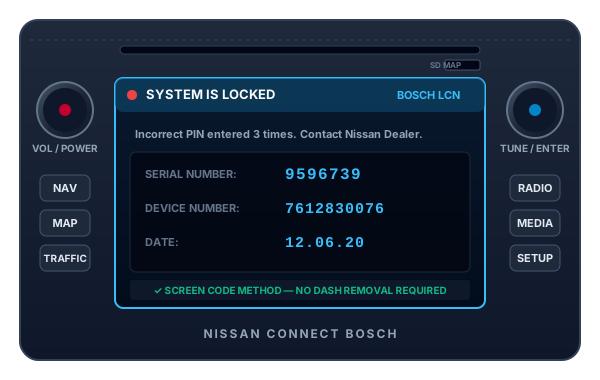
Switch on your ignition and turn on the Nissan Connect unit. Enter any incorrect 4-digit PIN code three times in a row. The system will lock and automatically bring up a system information screen displaying your Serial Number (7 digits, e.g. 9596739), Device Number (e.g. 7612830076), and Production Date (e.g. 12.06.20).
Read Serial, Device & Production Date Numbers
Note down the 7-digit Serial Number, 10-digit Device Number starting with 7612..., and the Date. If your screen is damaged, you can also slide the unit forward to view the white Bosch label on top of the casing where the serial is printed as CM0076... or 7 612 830 xxx.
Enter 4-Digit Factory PIN on Touchscreen
Once you receive your official 4-digit code, wait for the screen countdown timer if active (e.g. "Wait 60 min"). When the keypad is active, tap your 4 digits using the on-screen numeric touch buttons and press OK. Your audio, navigation, and Bluetooth will unlock immediately.
Nissan Connect Bosch LCN EU Stereo Specifications
Our decoding system communicates with the official Nissan OEM authorization database. Review the technical parameters below to ensure complete compatibility with your head unit.
| Unit Manufacturer | Bosch Automotive Multimedia / Blaupunkt |
|---|---|
| Screen Size | 5.0-Inch High-Definition Color TFT Touchscreen |
| Supported Generations | Nissan Connect LCN 1, LCN 2, LCN EU |
| Part Number Pattern | 7 612 830 xxx / 25915BHxxx |
| Serial Format | 7-Digit Numeric (e.g. 9596739) or 14-char CMxxxx |
| Memory & Security | Bosch Sec-EEPROM Encrypted PIN Algorithm |
| Average Delivery Speed | Instant Automated Delivery (Under 60 Seconds) |
Select Another Nissan Model or Radio
We decode security codes for every Nissan vehicle, commercial van, and factory audio manufacturer.
Nissan Connect Bosch LCN EU Code FAQs
Answers to common questions about retrieving serial numbers and unlocking your Connect Bosch LCN.